Geek Bar Zodiac and Rocket Signs: What Each Symbol Means
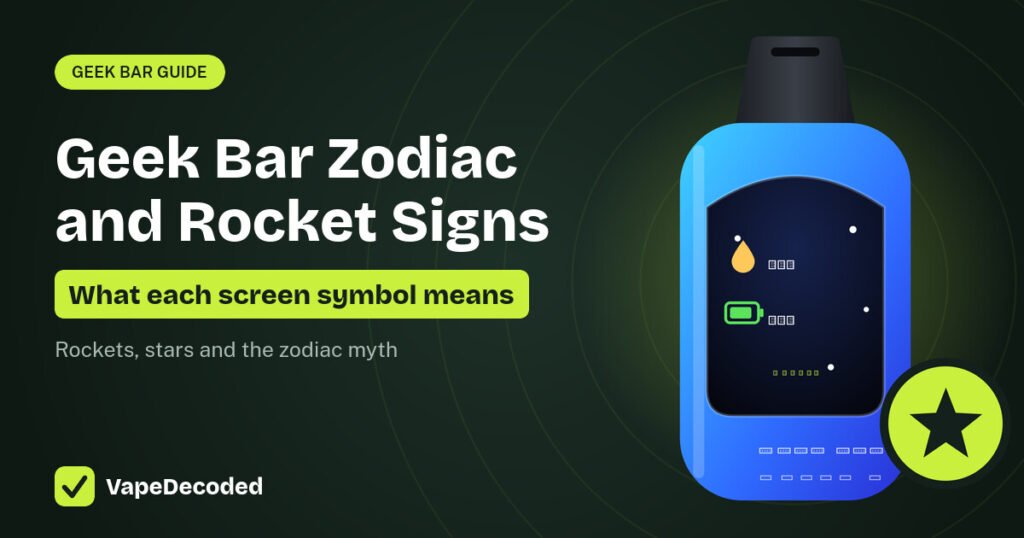
The rocket on a Geek Bar Pulse means the device is in Pulse mode, its high-power setting. The stars and "constellation" on a Pulse X are a screen animation that shows when you draw, and Geek Bar has not published any zodiac sign for any flavor, so no Geek Bar is officially "the Aries one" or "the Libra one."
This guide explains every symbol we could confirm on the Pulse, Pulse X and the newer 2026 models, what the "Zodiac edition" label from retailers really is, and how to check what your own device is showing.
Quick answer
- Rocket icon: Pulse mode is on (original Geek Bar Pulse). Regular mode shows a dashed circle instead.
- Stars on a Pulse X: the "Star UI" animation. In Pulse mode, lines join the stars into a constellation and an X shows in the center circle.
- Which constellation? A hands-on review found every Pulse X flavor shows the same pattern, and it did not look like a real constellation.
- Zodiac signs per flavor: Geek Bar publishes no sign-to-flavor list. We could not confirm any mapping, so we do not give one.
- "Zodiac edition": a retailer label for a small set of Geek Bar Pulse flavors. Geek Bar's own Pulse page does not use the word.
What does the rocket mean on a Geek Bar?
On the original Geek Bar Pulse, the rocket means Pulse mode is on. The Vaping360 review of the Pulse (April 2024) says Pulse mode "is indicated by a rocket icon and red light that tracks along the outer edges of the screen." Regular mode shows "a dashed circle in the middle of the screen with a green light."
So the rocket is not a flavor sign or a warning. It only tells you which power setting the bottom switch is on. Pulse mode sends more power to the dual mesh coil (2 small mesh heating parts that turn liquid into vapor) and opens an extra air hole, so each puff is bigger.
The screen only lights up while you draw and turns off a few seconds after. If you never see the rocket, the switch is probably on Regular.
What is "rocket mode" on a Geek Bar?
"Rocket mode" is not an official name. People use it for Pulse mode because of the icon. Geek Bar rates the Pulse at 15,000 puffs in Regular mode and 7,500 in Pulse mode. These are the brand's lab numbers, not a promise, but they show that the rocket setting uses juice and battery about twice as fast.
The liquid stays 5% nicotine (50 mg/mL) in both modes. A bigger puff can still deliver more nicotine per puff. Our guide to Pulse mode vs Regular mode on a Geek Bar covers the power and airflow details.
How do you turn the rocket off?
Slide the switch on the bottom back one click, from Pulse to Regular. The rocket goes away and the dashed circle shows on your next puff. Slide it one more click to Close to turn the device off.
What constellation is on the Geek Bar Pulse X?
Geek Bar calls the Pulse X screen "Star UI." Its product page says "PULSE X delivers a starry screen" and "The dots of light accompany you throughout vaping time." It does not name a constellation.
The most detailed description we found is the Versed Vaper Pulse X review (Robert Barnes, July 2024):
- In Regular mode, the screen shows "glistening and scintillating stars."
- In Pulse mode, "lines appear to form a constellation with the stars."
- A small circle made of stars sits between the battery and e-liquid numbers. In Pulse mode, "an X appears inside of the circle."
- "All of the flavors display the same constellation."
- The reviewer added that "it doesn't appear to be an actual constellation."
So there is no hidden star sign on a Pulse X. The pattern is a design, not Leo, Orion or any named group of stars that we could confirm. The constellation is just how the Pulse X shows that Pulse mode is on, the same job the rocket does on the original Pulse.
What constellation is on the Blue Rancher Geek Bar?
Blue Rancher is a Pulse X flavor, so it shows the same starry screen as the rest of the Pulse X range. Versed Vaper found the same pattern on every flavor it tested. We found no source that gives Blue Rancher, Blue Razz Ice, Sour Apple Ice, Strawberry B-Pop, Strawberry Colada or White Peach Raspberry its own constellation.
Is the constellation on the Geek Bar Pulse too?
No. The original Pulse (the 15,000-puff model) does not have the starry screen. Geek Bar's Pulse page says the screen "displays different cosmic-style animations" during vaping and charging, with a space capsule theme ("Board the Spaceship, Travel to Fruit Planet"). The rocket is part of that theme. The star constellation belongs to the Pulse X.

Every Geek Bar screen symbol and what it means
Newer models use different pictures, so the symbol you see depends on your device. The table lists what we could confirm from Geek Bar's pages and named hands-on reviews.
| Symbol | Model | What it means | Source |
|---|---|---|---|
| Rocket + red light around edge | Pulse | Pulse mode is on | Vaping360 review |
| Dashed circle + green light | Pulse | Regular mode is on | Vaping360 review |
| Lightning bolt + % | Pulse, Pulse X | Battery level | Vaping360, Versed Vaper |
| Droplet + % | Pulse, Pulse X | E-liquid left | Vaping360, Versed Vaper |
| Stars only | Pulse X | Regular mode | Versed Vaper review |
| Stars joined in a constellation + X in circle | Pulse X | Pulse mode | Versed Vaper review |
| Falling stars + green light bars | Pulse X 2 | Regular mode | Versed Vaper review |
| Planet lights up + orange light bars | Pulse X 2 | Pulse mode | Versed Vaper review |
| Green lights + planet | Pulse 2 | Regular mode | Versed Vaper, Vaping360 |
| Orange lights + planet with stars or "black hole" graphic | Pulse 2 | Pulse mode | Versed Vaper, Vaping360 |
The 2 Pulse 2 reviews describe the Pulse mode graphic in different words (stars around a planet vs a black hole). Both agree on green for Regular and orange for Pulse.
Versed Vaper says the Pulse X 2 uses "a falling-stars type of pattern rather than the constellation pattern that was on the original." So if you have a newer Pulse X 2, you will not see the constellation at all. Our Geek Bar Pulse vs Pulse X comparison covers the other differences between these models.
Which Geek Bar is Aries, Libra or Virgo?
We could not find any Geek Bar flavor that is officially tied to a zodiac sign. That covers all 12: Aries, Taurus, Gemini, Cancer, Leo, Virgo, Libra, Scorpio, Sagittarius, Capricorn, Aquarius and Pisces.
Here is what we checked in October 2026:
- Geek Bar's Pulse X page lists more than 40 flavors. None of the flavor or group names mention a zodiac sign, a star sign or a constellation.
- Geek Bar's Pulse page lists flavor groups such as Savers, Mintz, Sour and Frozen. There is no group called Zodiac, and no flavor named after a sign.
- The only "Zodiac" source we found is a retailer article (JellyPuffs, October 2025). It does not match any sign to any flavor (details below).
- Versed Vaper found the same constellation on every Pulse X flavor, so the screen cannot tell flavors apart by sign.
Because no source gives a sign-to-flavor list, we do not print one. Lists you may see on social media or in "which flavor is your sign" posts are fan picks or guesses, not Geek Bar data.
Which Geek Bar has the Cancer sign?
None that we could confirm. No Geek Bar flavor or edition is named Cancer. If you are asking about health, we found no evidence that any one Geek Bar flavor causes cancer, but every flavor delivers addictive nicotine (see the warning box near the end of this page).
What does Libra mean on a Geek Bar?
We found no official Geek Bar symbol, screen label or flavor called Libra. If your device or box shows a sign name, it is not a feature Geek Bar lists for the Pulse or Pulse X. Check the packaging and the security code (see the steps below).
What is the Geek Bar Zodiac edition?
"Zodiac edition" is a label used by at least one online retailer. The JellyPuffs article "Geek Bar Pulse Editions Explained" (October 6, 2025) lists a Zodiac edition with 3 flavors: Grape-B Burst, Dragon Melon and Blueberry Watermelon. It says "each flavor is inspired by an astrological vibe," but it does not say which sign goes with which flavor.
The same article lists a "Planet edition" with Tropical Rainbow Blast, Mexico Mango and Blue Razz Ice. It describes both as flavor themes on the normal Pulse 15K, not new hardware.
Geek Bar's own Pulse page does list Dragon Melon, Blueberry Watermelon and Grape B-Pop, along with the 3 "Planet" flavors. But the page shows no group called Zodiac or Planet. We could not confirm that either edition name comes from Geek Bar. For what the odd flavor names taste like, see our Geek Bar mystery flavors guide.
Why does Geek Bar have zodiac signs and stars?
Geek Bar has not explained the space theme in any statement we found. What its pages do show is a design theme across models:
- Pulse: a "space capsule-inspired exterior" and "cosmic-style animations."
- Pulse X: "Light Up the Sky with Star UI."
- Pulse 2 and Pulse X 2: planet graphics and colored light bars, per reviews.
Our best reading is that the stars and the constellation are why people link Geek Bar to the zodiac. A constellation on screen plus a retailer "Zodiac edition" label is enough to start the "which sign is my flavor" searches. We could not find the post or trend that started it.
How to check what your own Geek Bar is showing
Find the model name
Look at the box or the side of the device. "Pulse" and "Pulse X" have different screens. The Pulse X has a large curved screen that wraps around the front.
Check the bottom switch
Note whether the switch is on Regular or Pulse. Then take a short puff and watch the screen. A rocket (Pulse) or a joined-up constellation with an X (Pulse X) means Pulse mode.
Read the numbers, not the picture
The lightning bolt number is battery and the droplet number is e-liquid. When the battery number is low, see our guide on how to charge a Geek Bar.
Check the security code if something looks off
A sign name printed on the device, a screen that does not match the reviews, or poor print quality can be warning signs. Geek Bar puts a scratch-off code on the side of the box that can be checked once at geekbar.com/security-code.html. "Valid security code" means real. "Sorry, invalid security code" means fake. Our guide on where to buy Geek Bar and how to avoid fakes has more checks.
Tip: Vaping360 says you "can't turn off the screen lights" on the Pulse, and Versed Vaper found no way to switch off the stars on the Pulse X. The screen lights up while you draw and turns off a few seconds after.
For adults 21+ only. Every Geek Bar contains 5% nicotine, which is addictive, whatever the screen shows. No Geek Bar is FDA authorized as of October 2026 (see is Geek Bar banned). The CDC says nicotine harms the developing brain, which keeps growing until about age 25. If you want to quit, free help is at Smokefree.gov or 1-800-QUIT-NOW.
FAQs
Does the rocket mean my Geek Bar is about to die?
No. The rocket shows the power mode, not the battery. Battery level is the number next to the lightning bolt.
Is the Pulse X constellation a real star pattern?
We could not confirm that it is. Geek Bar does not name it, and the Versed Vaper reviewer said it did not look like a real constellation.
Do different Pulse X flavors show different constellations?
No, based on the only hands-on test we found. Versed Vaper said all flavors showed the same pattern.
Does the Pulse X 2 still have the constellation?
No. Versed Vaper says the Pulse X 2 shows falling stars, and a planet lights up in Pulse mode.
Are Planet and Zodiac editions stronger?
No. The retailer that uses these names describes them as flavor themes on the same Pulse device. The liquid is 5% nicotine like other Geek Bar Pulse flavors.
Can I turn off the stars on a Pulse X?
Not on the original Pulse X, based on the Versed Vaper review, which wished for a button to toggle the stars. We could not confirm whether any newer model adds an off switch for the lights.
The bottom line
On a Geek Bar Pulse, the rocket means Pulse mode. On a Pulse X, the stars join into a constellation with an X in the center when Pulse mode is on, and every flavor shows the same pattern. Geek Bar has not linked any flavor to Aries, Libra, Cancer or any other sign, and the "Zodiac edition" name comes from a retailer, not from Geek Bar's own pages.
Related Geek Bar guides
Sources: Geek Bar: Pulse, Geek Bar: Pulse X, Geek Bar: Security code check, Vaping360 Geek Bar Pulse review, Vaping360 Pulse 2 review, Versed Vaper Pulse X review, Versed Vaper Pulse X 2 review, Versed Vaper Pulse 2 review, JellyPuffs: Geek Bar Pulse editions, CDC: Health effects of vaping, Smokefree.gov. VapeDecoded is not affiliated with Geek Bar.
Safety note: Our guides are for general information only. Stop using any device that gets hot, swells, smells like burning plastic or leaks from the battery. Read our disclaimer.
Image credits: Product images on this page belong to their respective brands and are used for identification and education only. If you own an image and want it removed or credited, send us a request and we will act on it within 48 hours.